 Social Studio

UltraDialogue is a Paper plugin by Social Studio (GupeLegend) that turns any NPC — or any entity — into a character with real conversations: a portrait, what it says, and the player's replies as on-screen buttons. It uses the native dialogue screens Minecraft introduced in the 1.21.6 client, so it needs no mod and, in its basic presentation, no resource pack either. Every reply can branch the conversation, open a menu, give or take items, change the player's affinity with that character, or run any command.
What it is
UltraDialogue started out as "Dialogos", a private plugin built for a single server, and in October 2026 it was rewritten and released as UltraDialogue, open source under the MIT license. The goal is simple: building a conversation with branches, conditions and rewards should be as easy as writing a YAML file, with no need for an external graphical editor or a client mod.
Each dialogue is a .yml file inside the dialogues/ folder; the file name is the dialogue's id. Inside it, a series of nodes represent each turn of the conversation: what the character says and the buttons the player answers with. Replies can lead to another node, open a menu, run commands, change affinity, give items or complete quests — and all of it can be conditioned on permissions, flags, affinity, items in the inventory, or any PlaceholderAPI placeholder.
Note: UltraDialogue doesn't draw NPCs or build scenery. The NPCs, the world, the quests, the Codex and any other resource-pack customization visible in this page's screenshots belong to the server where they were taken — they don't ship with the plugin.
Features
- Branching conversations in YAML: nodes, replies, and where each one leads.
- Actions on any reply: jump to another node or dialogue, open a menu, run a command as the player or as console, send a message / title / action bar, play a sound.
- Button sizes and icons: four button sizes just like the pause menu's (from the small square up to full width), and a set of ten quest-style symbols — quest, main/side/riddle marker, accept, back, exit, reward, story and chance. They're text, so no resource pack is needed.
- The NPC's face: a 2D face taken from the NPC's skin, next to its name.
- Free rows (
layout: [1, 2, 2, 1]): any number of buttons per row, something Minecraft's native grid can't do on its own. - RPG buttons: with the plugin's optional button pack (which it offers on join), those buttons are drawn as a panel with a flat dark background and a double frame colored by its function. Without the pack, they look like
[ text ]. - Locked replies and navigation: replies that can't be picked yet show in gray with a hint, a Back button that remembers the path taken, and a fixed Exit at the bottom, plus per-node titles.
- Deliveries: check, take and give items — vanilla, UltraBoss trophies, or any item by its hidden tag, its model or its name. Taking is all-or-nothing and re-checked on click, so there's no duplication.
- Story and quest gating: conditions on BeautyQuests quests (
quest: completed 12), its own BeautyQuests stage type, and affinity and flag placeholders. - Conditions: hide replies or change where the conversation starts — permissions, player flags, and any PlaceholderAPI placeholder (
%vault_eco_balance% >= 1000). - Player flags: remember that someone already met a character, took a job, or finished a step, so they get greeted differently next time. They're stored on the player itself, with no database.
- Affinity: a hidden friendship level per player and per character. Kind replies raise it, rude ones lower it, and as it grows it unlocks new greetings, questions and secrets. The player never finds out it changed.
- Conversations that never repeat the same way: several variants per line (a different one each time) and rotating questions, so talking to the same NPC twice doesn't feel scripted.
- Portraits: the NPC's own skin, any player's skin, a fixed texture, or an item.
- FancyNpcs support out of the box: linking a dialogue to an NPC by its name makes a click open the conversation instead of its FancyNpcs actions. Your
npcs.ymlis never touched. - Any entity can talk, with a tag:
/tag @e[type=villager,limit=1,sort=nearest] add dialogue:merchant. - Older clients coming in through ViaVersion (pre-1.21.6) get the same conversation in chat, with clickable replies.
- English and Spanish included out of the box — and, as explained below, also in the dialogue files' own keys.
Requirements and compatibility
| Paper | 26.1.2 (verified server target) |
| Java | 25 |
| api-version | 26.1.2 |
| Folia | Not supported (folia-supported: false) |
| Bedrock / Geyser | Not verified |
The chat fallback for older clients (via ViaVersion) does not imply compatibility with server versions older than 26.1.2: it only changes how an old client receives the dialogue, not which server runs it.
Everything else is optional and detected at runtime:
| Plugin | What it's used for |
|---|---|
| FancyNpcs | Clicking an NPC opens its dialogue |
| PlaceholderAPI | Placeholders in text, actions and conditions |
| DeluxeMenus | The menu: action (any menu plugin works by changing menu-command) |
| ViaVersion | Sends older clients the chat version |
| BeautyQuests 2.1 | Quest conditions and actions, the ULTRADIALOGUE stage type |
Important: these five plugins are listed as
softdependinplugin.yml, so UltraDialogue starts up fine without any of them. If one is missing, the part that depends on it simply stays inactive (for example, quest conditions are always false without BeautyQuests), and the console warns about it once per dialogue.
Installation
- Drop the
.jarintoplugins/and start the server. On first startup, three example dialogues are created (example.yml,merchant.ymlandkadir.yml). - The plugin's data lives in
plugins/UltraDialogue/, its own regular Bukkit folder. If you're coming from a version that still used the sharedplugins/UltraView/UltraDialogue/folder, the plugin moves everything automatically the first time it starts (it announces this once in the console, and deletes the old folder only once it's empty). Yourconfig.ymland your dialogues are never overwritten by an update. - The icon symbols need no pack at all. For the internal RPG panels to serve themselves, you need a reachable public address and a port (8083 by default). A failure to open the port is logged in the console, but a firewall or NAT block may just look like a failed download on the client side. With
buttons: auto, players only see panels after successfully downloading the pack; if it fails, they simply see the plain-text presentation. - Every time you edit a dialogue, run
/ud reload. The console tells you which file, which node, and which reference is broken if something fails./ud reloaddoesn't close conversations already in progress: close and reopen them after reloading their definition. Changing the port or the pack delivery does require a server restart; reloading does not restart the pack's own server.
Tip: if another plugin (EcoItems, for example) already delivers a merged resource pack to you, you don't need UltraDialogue to serve its own separately. The Configuration section below explains how to merge the plugin's ZIP into that external pack and switch to
buttons: pack.
Your first dialogue
Let's build a character from scratch: a lookout who greets you differently the first time, and offers to open a shop or tell a secret.
Step 1 — create the file. Copy dialogues/example.yml (or start from scratch) as dialogues/vigia.yml. The file name, without the extension, is the dialogue's id: vigia.
Step 2 — write the header. name is what's shown as the screen's heading; npcs are the FancyNpcs NPC names that should open this dialogue on click (it can be left empty if you're going to use it with an entity tag or with /ud open); portrait is the image next to the text, with alternatives separated by |.
Step 3 — decide where it starts. start is a list of rules; the first one whose if is true is used. Here we use a flag to tell a first visit apart.
Step 4 — write the nodes. Each node is a turn: its text (what the character says) and its answers (the player's buttons).
name: '&b&lThe Lookout'
npcs: [vigia]
portrait: 'npc | item:SPYGLASS'
sound: 'entity.villager.ambient 0.6 1.1'

start:
  - if: '!flag:vigia_visto'
    node: primera_vez
  - node: menu

nodes:
  primera_vez:
    on-show: ['flag: vigia_visto']
    text:
      - 'Far enough. Not many make it up this tower.'
      - 'As long as you cause no trouble, you are welcome here.'
    next: menu                 # no "answers": a single "Continue" button

  menu:
    text: 'What do you need?'
    answers:
      - text: '&2See the shop'
        icon: accept
        actions: ['menu: shop']
      - text: '&7What can you see from up here?'
        tooltip: '&7The lookout knows every path.'
        goto: vista
      - text: '&8Nothing, thanks'
        goto: end

  vista:
    text: 'From this tower I see the whole valley... and anyone approaching through it.'
    answers:
      - text: '&7« Back'
        goto: menu
Step 5 — try it out. You don't need any NPC to open the dialogue directly:
/ud open vigia
Step 6 — reload and link it. If you edit the file while the server is running, use /ud reload. For a real FancyNpcs NPC to open it on click, create the NPC with the name vigia (the internal name, not the display name) — that's it, no need to touch npcs.yml. If you're using another entity (a villager, say), tag it instead of using FancyNpcs: /tag @e[type=villager,limit=1,sort=nearest] add dialogue:vigia.
dialogues/example.yml ships with, commented out, practically every option that exists — it's the best starting point to copy and paste from.
Dialogue file format
Every file accepts its keys in English or in Spanish, interchangeably (so files from the earlier private plugin, "Dialogos", load without needing to be touched). The table below lists each key alongside its Spanish alias.
| English | Spanish alias | Where it's used |
|---|---|---|
name |
nombre |
dialogue header |
portrait |
retrato |
header |
sound |
sonido |
header and node |
columns |
columnas |
header and node |
start |
inicio |
header |
node |
nodo |
inside a start rule |
if |
si |
conditions (start rule, reply, variant) |
nodes |
nodos |
header |
speaker (also name/nombre) |
— | node: who speaks on that turn |
text |
texto |
node and variant |
variants |
variantes |
node |
on-show |
al-mostrar |
node |
next |
siguiente |
node |
show |
mostrar |
node |
title |
titulo / título |
node |
answers |
respuestas |
node |
nav |
navegacion / navegación |
node |
layout |
filas |
node |
tooltip |
— | reply |
goto |
ir |
reply |
actions |
acciones |
reply, on-show |
always |
siempre |
reply |
icon |
icono |
reply |
size |
tamano / tamaño |
reply |
width |
ancho |
reply |
locked |
bloqueada / bloqueado |
reply |
style |
estilo |
reply, node, dialogue |
border |
borde |
reply, node, dialogue |
border-color |
color-borde |
reply, node, dialogue |
fill-color |
color-fondo |
reply, node, dialogue |
affinity |
afinidad |
header (its own section) and action |
Note: the plugin's code is entirely in English (identifiers, comments, console messages); bilingual support is only for the keys in the dialogue files.
File header
name: '&2&lThe Wandering Merchant'   # title shown above the screen
npcs: [merchant]                     # FancyNpcs NPC names that open this dialogue
portrait: 'npc | item:EMERALD'       # alternatives separated by "|": the first one that can be shown wins
sound: 'entity.villager.ambient 0.7 1'   # optional; if missing, uses talk-sound from config.yml
columns: 1                           # default buttons per row for this whole dialogue (optional)
The portrait (portrait) accepts, separated by | as alternatives:
| Value | What it shows |
|---|---|
npc |
the skin of the NPC or entity that opened the chat, as a 2D face |
player:Name (jugador:) |
that player's skin |
texture:<base64> (textura:) |
a fixed texture, as a 2D face |
item:MATERIAL |
the item to the left of the text (shows no face) |
none |
nothing |
start: where the conversation begins
A list of rules; the first one whose if is true wins. A bare start: node_name (without a list) also works, for dialogues that always start the same way.
start:
  - if: 'affinity >= 25'
    node: friend
  - if: '!flag:conocido'
    node: first_time
  - node: normal
Nodes (nodes)
Each node is a conversation turn. Its fields:
| Field | What it does |
|---|---|
speaker |
who speaks on this turn (otherwise, the dialogue's name) |
text |
one line, or a list of lines, that the character says |
variants |
instead of text, several versions of the line; one is picked at random each time, never the same one twice in a row. Each variant can have its own if |
on-show |
actions that run as soon as the node is shown (set a flag, give an item, play a sound...) |
answers |
the list of the player's reply buttons |
next |
if the node has no answers, a single "Continue" button leads to this node |
show |
if greater than 0, only that many replies not marked always are shown, chosen at random each time |
columns |
buttons per row, for this node only |
title |
screen heading for this node only (otherwise, the character's name) |
nav |
navigation buttons (Back, Exit, or a full reply) on the last row |
layout |
buttons per row, row by row — see Free rows |
Replies (answers)
answers:
  - text: '&2Show me your goods'
    icon: accept
    size: 2
    tooltip: '&7Opens the "shop" menu'
    if: 'permission:group.vip'
    locked: '&7VIP only.'
    actions: ['menu: shop']
    goto: fin_amable
| Field | What it does |
|---|---|
text |
the button's text (can be left empty if it's icon-only, with size: 1) |
tooltip |
text shown when hovering over it |
if |
condition(s) for the reply to be shown — see Conditions |
locked |
if the if fails, instead of hiding the reply it's shown grayed out with this notice (locked: true uses the language file's default text) |
actions |
list of actions that run on click — see Actions |
goto |
which node it leads to after the actions (end or fin ends the chat) |
always |
doesn't count toward show's rotation — always appears |
icon |
name of one or more icons (icon: quest side) |
size / width |
the button's size — see Buttons |
style / border / border-color / fill-color |
the RPG panel appearance for this reply, if force/force-colors allow it |
Navigation (nav)
nav:
  - back                              # previous screen of this conversation
  - text: '&eReward'                  # any full reply also works inside nav
    actions: ['console: give %player% emerald 1']
  - exit                              # fixed at the bottom of the screen
backwalks back through this conversation's screen history, even across different dialogues. On the first screen, it closes the chat (it's always shown, so the grid's shape never breaks).exitgoes in the footer of the screen. Minecraft only has room for one fixed button there;backand the rest ofnavtake up the grid's last row.- Without
nav:, a "Goodbye" button appears at the end.
Buttons, sizes and icons
Sizes
| Size | Width | Pause-menu equivalent |
|---|---|---|
size: 1 |
20 px | the small square button ("report") |
size: 2 |
98 px | "Options...", half width |
size: 3 |
150 px | a medium button |
size: 4 |
204 px | "Disconnect", full width |
width: 130 |
any, 1–1024 px | exact width |
Native buttons are 20 px tall; free-row panels (with the pack) are 24 px. columns: controls the native grid, for the whole dialogue or a single node; layout: controls the free rows.
Icons
/ud icons lists them in-game, drawn exactly as that player sees them. Since 1.1.2 they're text symbols, so they look the same with or without a resource pack:
| Name | English | Symbol | Meaning |
|---|---|---|---|
mision |
quest |
! (orange) |
there's a quest |
principal |
main |
• (green) |
marker: main quest |
secundaria |
side |
• (blue) |
marker: side quest |
acertijo |
riddle |
• (purple) |
marker: riddle |
aceptar |
accept |
✓ (green) |
accept |
volver |
back |
« |
back |
salir |
exit |
× (red) |
exit |
premio |
reward |
± (yellow) |
quest rewards |
cuento |
story |
♪ (light blue) |
a story the NPC tells |
probabilidad |
chance |
% |
something may happen (or drop) by chance |
Several icons on the same button, separated by spaces: icon: quest side shows ! • with the blue marker. [quest, side] and quest+side also work.
Important: 1.1.2 replaced the 20 pixel-art icons from 1.1.1 (
heart,gem,gift,star,shop...). An icon that no longer exists breaks nothing: the button is shown without it, and the console warns once per dialogue. If you're coming from 1.1.1, check your icon-only replies (no text): they would now end up with a blank button.
Free rows (layout) and RPG panels
Minecraft only lets servers arrange real buttons in a uniform grid, with a single exception: one leftover button at the end can take its own row. That's enough for a "2 + 2 + 1 wide" layout, but not for "1 wide + 2 + 2", nor for three small buttons side by side in one row (Back · Exit · Reward).
layout: [1, 2, 2, 1] solves that by drawing the buttons as clickable text inside the dialogue's body, instead of as real buttons:
nodes:
  menu:
    title: '&6Quests from Brann'
    text: 'What do you want to ask?'
    layout: [1, 2, 2, 1]
    answers:
      - {text: '&fMain quest', icon: quest main, goto: principal}
      - {text: '&fSide quest', icon: quest side, goto: q1}
      - {text: '&fSide quest', icon: quest side, goto: q2}
      - {text: '&fRiddle', icon: quest riddle, if: 'affinity >= 10', locked: '&7Not yet.', goto: q3}
      - {text: '&fA story', icon: story, goto: q4}
      - {text: '&7Just passing by', goto: end}
    nav:                              # REAL buttons, all in one row, in this order
      - back
      - exit
      - {text: '&eReward', icon: reward, actions: ['console: give %player% emerald 1'], goto: menu}
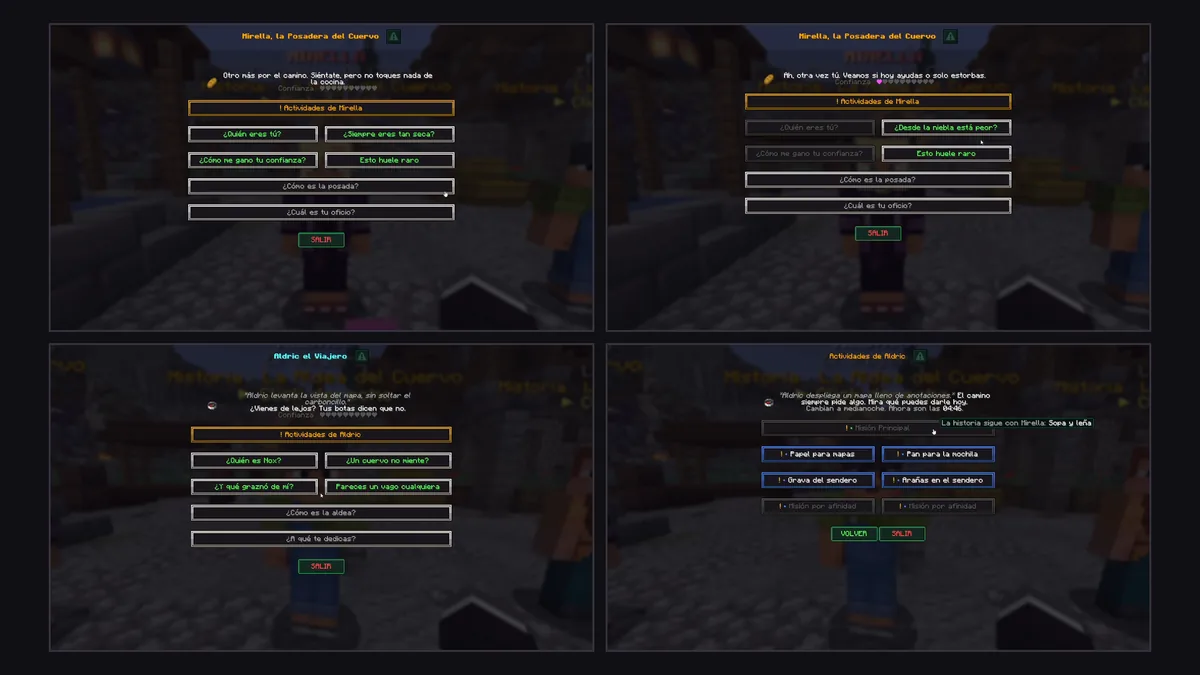
Real screens from a server configured with layout:: each row has its own number of buttons, something Minecraft's native grid can't do on its own.
- Rows are filled with the replies in order; any leftovers get one per row.
nav:buttons are real Minecraft buttons, all in one row at the bottom, in the order they're written — so Back, Exit and a "Reward" can end up side by side.- Without the pack, each
layout:button looks like[ text ], formatted byscreen.layout.button-formatinconfig.yml. With the pack loaded (andbuttons: autoorpack), it's drawn as a panel: a flat dark background and a double frame, colored by the last colored icon the button has. - Limitation:
layout:panels don't light up on hover (only the text line responds to clicks); thenav:row does, because it's native.
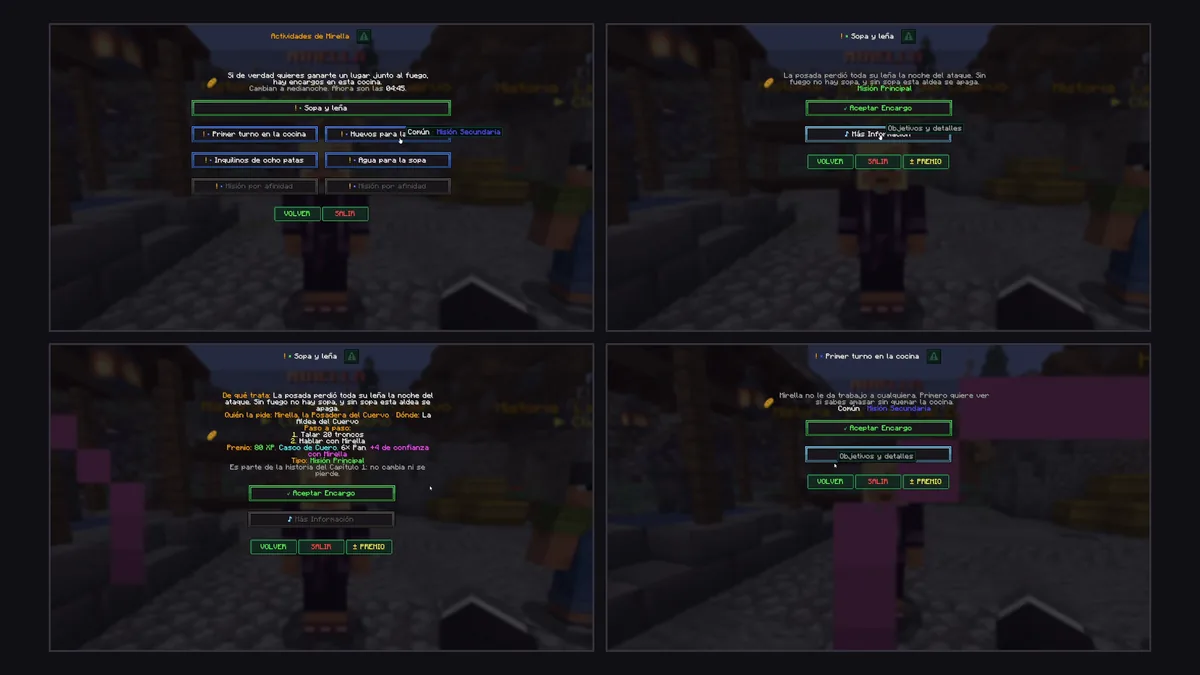
Each panel's frame follows the color of its last icon: orange for quest, green for main, blue for side, purple for riddle.
The pack that draws these panels has been very lightweight since 1.1.3: it only includes the flat background and the double border (there used to be ten different backgrounds and ten different borders). Older style or border names in a dialogue file or in config.yml still load without error: they fall back to flat/double with a one-time console warning per name.
Replies and branches
The simplest way to branch is by chaining goto: each reply leads to another node, and that node has its own replies. end (or fin) as a destination ends the chat.
To keep the same conversation from feeling identical every time:
variants:gives several versions of a line; one is picked at random each time the node is shown, never the same one twice in a row. Each variant can have its ownif.show: Nshows onlyNof the node's replies (out of the ones withoutalways: true), chosen at random on each visit. Handy so an NPC doesn't always drop the same five questions in the same order.always: truetakes a reply out of that rotation: it always appears (typically the farewell).
stranger:
  variants:
    - 'Yes? What do you want?'
    - 'I do not usually talk to strangers.'
  show: 2
  answers:
    - text: 'Hello, who are you?'
      goto: quien
    - text: 'Where are you from?'
      goto: origen
    - text: 'Nice compass.'
      goto: compas
    - text: 'Goodbye.'
      always: true
      goto: end
Affinity
Every player has a hidden affinity number with each character, starting at 0. Replies change it and conditions read it — so the same NPC can be cold with strangers and open up with friends:
start:
  - if: 'affinity >= 25'
    node: friend
  - node: stranger

nodes:
  stranger:
    answers:
      - text: 'Hello. Who are you?'
        actions: ['affinity: +2']
        goto: quien
      - text: 'Get out of my way.'
        actions: ['affinity: -3']
        goto: end
- The player never sees the number or finds out it changed. Staff can check it with
/ud affinity <player> <id>. - Anti-farming: a character only gives affinity once every
cooldown-minutes(30 by default), and at mostmax-per-talkpoints (3) per conversation. Losing affinity has no limit. - The defaults live in
config.yml, underaffinity:; each dialogue can bring its ownaffinity:section to override them just for that character. - It only exists in dialogues that use it: a menu NPC that never mentions affinity behaves exactly as it did before this feature existed.
- A variant can have its own
if({text: '...', if: 'affinity >= 10'}).
dialogues/kadir.yml, bundled with the plugin, is a full example with four friendship levels, rotating questions, and a one-time gift.
Conditions
Used in if: — of a start rule, a reply, a variant, or locked:. Every line in the list must be true (they're an AND); within a single line, || means "or".
if:
  - 'permission:group.vip || permission:ultradialogue.admin'
  - '!flag:ya_hablado'
| Condition | Spanish alias | True when |
|---|---|---|
permission:<node> |
permiso: |
the player has that permission |
flag:<name> |
marca: |
the player has that flag |
has: ITEM N |
tiene: |
the player carries at least N of that item, anywhere in the inventory |
hand: ITEM N |
mano: |
they're holding at least N of that item in the main hand |
quest: completed <id> |
mision: completada / terminada |
they finished that BeautyQuests quest |
quest: started <id> |
mision: en-curso / empezada |
they started it and haven't finished it |
quest: active <key> |
mision: activa |
they're currently on a ULTRADIALOGUE stage with that key |
affinity >= N |
afinidad |
their affinity with this character meets the comparison |
affinity:<id> >= N |
afinidad:<id> |
their affinity with another character meets the comparison |
%placeholder% >= N |
— | any PlaceholderAPI placeholder, compared |
Any condition can be negated with ! at the start (!flag:conocido), unless it starts with !=, which is the "not equal to" operator.
Placeholder comparisons accept ==, !=, >=, <=, >, < and contains (contiene):
if: '%vault_eco_balance% >= 1000'
if: '%player_name% contains Gupe'
Note: the numeric comparison understands both
1.234,50and$1,234.50— the two most common formats economy plugins give their placeholders in.
Without BeautyQuests installed, the whole plugin still loads normally: quest conditions are simply always false, and the console warns about it once per dialogue.
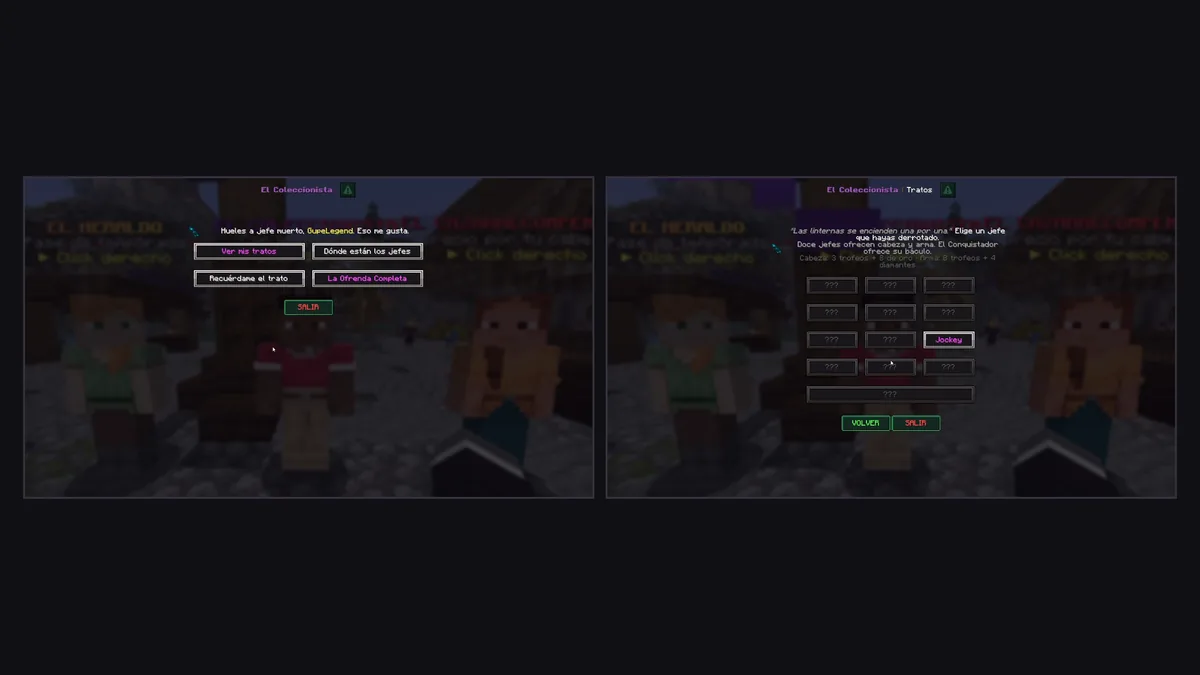
Replies with locked: show dimmed while their condition isn't met; clicking one only shows the notice in the action bar, without running anything.
Actions
Used in actions: (of a reply or of on-show). They run in order, top to bottom.
| Action | Alias | What it does |
|---|---|---|
goto: node |
ir: |
goes to another node (end ends the chat) |
dialogue: id [node] |
dialogo: / dialog: |
switches to another dialogue, optionally at a specific node |
menu: name |
— | opens a menu (runs menu-command from config.yml; DeluxeMenus by default) |
command: spawn |
comando: |
runs the command as the player |
console: give %player% diamond 1 |
consola: |
runs it as console |
message: text |
mensaje: |
private message to the player |
broadcast: text |
anuncio: |
message to the whole server |
actionbar: text |
— | text in the action bar |
title: Title\|Subtitle |
titulo: |
on-screen title |
sound: entity.villager.yes 1 1 |
sonido: |
also accepts ENTITY_VILLAGER_YES |
flag: name |
marcar: |
sets a flag on the player |
unflag: name |
desmarcar: |
removes it |
affinity: +2 / -3 / =10 |
afinidad: |
changes affinity (with another character: affinity: otro_id +2) |
take: ITEM N |
quitar: |
takes N of that item (all or nothing) |
give: ITEM N |
dar: |
gives N of that item |
quest: complete <key> |
mision: completar |
completes every active ULTRADIALOGUE stage with that key for the player |
quest: start <id> |
mision: empezar |
starts the quest, respecting its requirements |
quest: force <id> |
mision: forzar |
starts it with no requirements |
close |
cerrar: |
closes the screen |
actions:
  - 'message: &6You are VIP!'
  - 'sound: ENTITY_PLAYER_LEVELUP'
Important: when a reply ends the chat (opens a menu, runs a command...), the screen closes before the actions run, so the menu that opens ends up on top.
Deliveries: items, shop and rewards
The has:/hand: conditions and the take:/give: actions recognize several item formats, each one with a number at the end (1 by default):
| Format | What it matches |
|---|---|
IRON_INGOT / minecraft:iron_ingot |
that vanilla material — plain items only: one with a hidden tag or a custom model from another plugin doesn't count, so a vanilla item never confuses an UltraBoss trophy with a regular ingot |
ultraboss:<id> |
an UltraBoss item (also under its older names) |
ultrarevive:self / boost / end |
an UltraRevive totem |
pdc:<namespace:key>=<value> |
any plugin's hidden tag |
item_model:<namespace:model> |
by its item model |
name:&6Cellar Key (nombre:) |
by its display name (last resort) |
deliver:
  text: 'Did you bring the iron for the forge?'
  answers:
    - text: '&aDeliver 16 iron ingots'
      icon: accept
      if: 'has: IRON_INGOT 16'
      actions:
        - 'take: IRON_INGOT 16'
        - 'give: EMERALD 4'
        - 'affinity: +3'
      goto: gracias
    - text: '&8I do not have them yet'
      if: '!has: IRON_INGOT 16'
      goto: end
take:is atomic: it counts first and takes nothing if any is missing. Main hand first, then the rest of the inventory.- If
take:fails, the rest of that reply's actions are cut short — a reward is never given without being paid for first. The player gets theitem-missingmessage ("You don't have what's needed anymore."). - Conditions are re-checked on click. If you open the dialogue with 16 ingots, drop them, and then press "Deliver", nothing is taken or given: the screen simply redraws itself.
give:builds vanilla items on its own; UltraBoss and UltraRevive items are delivered with each plugin's own command, so they keep all their tags, name and texture.- A
startrule can react to what the player is holding:if: 'hand: IRON_INGOT 16'.
Quests and BeautyQuests
start:
  - if: '!quest: completed 12'
    node: too_soon
  - node: final_scene
UltraDialogue registers its own stage type in BeautyQuests, ULTRADIALOGUE, so a dialogue NPC can be a native part of a quest:
# in the BeautyQuests quest file
'3':
  stageType: ULTRADIALOGUE
  key: brann_hierro
  npc: brann                  # optional, only for the description
  customText: '§7Bring §f16 iron ingots §7to §fBrann'
# in the dialogue
- text: '&aDeliver the iron'
  icon: accept
  if: ['quest: active brann_hierro', 'has: IRON_INGOT 16']
  actions: ['take: IRON_INGOT 16', 'quest: complete brann_hierro']
It can also be created from BeautyQuests' in-game editor (it asks for the key). Two quests sharing the same key advance together.
quest: complete fires a normal Bukkit event, DialogueSignalEvent(player, key), which any plugin can listen for, with or without BeautyQuests installed.
Assigning dialogues to NPCs and opening them
There are four ways a conversation can start:
- FancyNpcs. Put the NPC's internal name (the one used in
/npc create, not its display name) in the dialogue'snpcs:list. Right-clicking (or left-clicking, ifleft-click: trueinconfig.yml) opens the conversation instead of FancyNpcs' own actions.npcs.ymlis never modified: removing the NPC from that list returns it to its normal behavior. - Any entity, with a tag.
/tag @e[type=villager,limit=1,sort=nearest] add dialogue:merchant(the olderdialogo:tag also works). Useful for villagers, armor stands, or any entity that doesn't come from FancyNpcs. - The
/ud opencommand. Works from the console or as another plugin's action, and doesn't require any NPC nearby. - As another dialogue's action, with
dialogue: id [node].
When opened by clicking an NPC or a tagged entity, there's also a cooldown (cooldown-ms in config.yml, 700 ms by default) and a maximum distance (max-distance, 8 blocks) beyond which replies stop working — so nobody can walk away mid-conversation and keep pressing buttons from afar.
The button editor (/ud)
Since 1.1.3, /ud with no arguments (or explicitly /ud editor) opens an in-game menu for admins: pick a dialogue, pick one of its nodes, and see its buttons — both the main replies and the nav: row.
The editor only touches buttons. The NPC's own lines, its conditions, its actions and affinity are still edited in the dialogue's .yml file; the menu's help text reminds you of that. "Save" rewrites only that node's answers:, nav: and layout: lines — every other node, every other key, and the rest of the file's comments stay untouched.
For each button you can:
- Edit its text — the menu closes, you type the new line in chat (or
cancelto leave it as is), and the menu reopens. - Change its icon — one of the 10 approved presets, or none.
- Change its size — cycles through auto / 1 / 2 / 3 / 4 (right-click to go backward).
- Move it up or down, or, in a node with
layout:, move it to another row. - Delete it, with a confirmation step.
- Add a new one — by picking an existing button as a template (its
goto, itsactionsand its conditions are copied as is), then editing its text and icon.
"Test" opens the dialogue exactly as it's currently saved; "Save" writes the buttons to the file; "Cancel", or simply closing the menu, discards any unsaved changes. The permission is the same ultradialogue.admin as any other /ud subcommand.
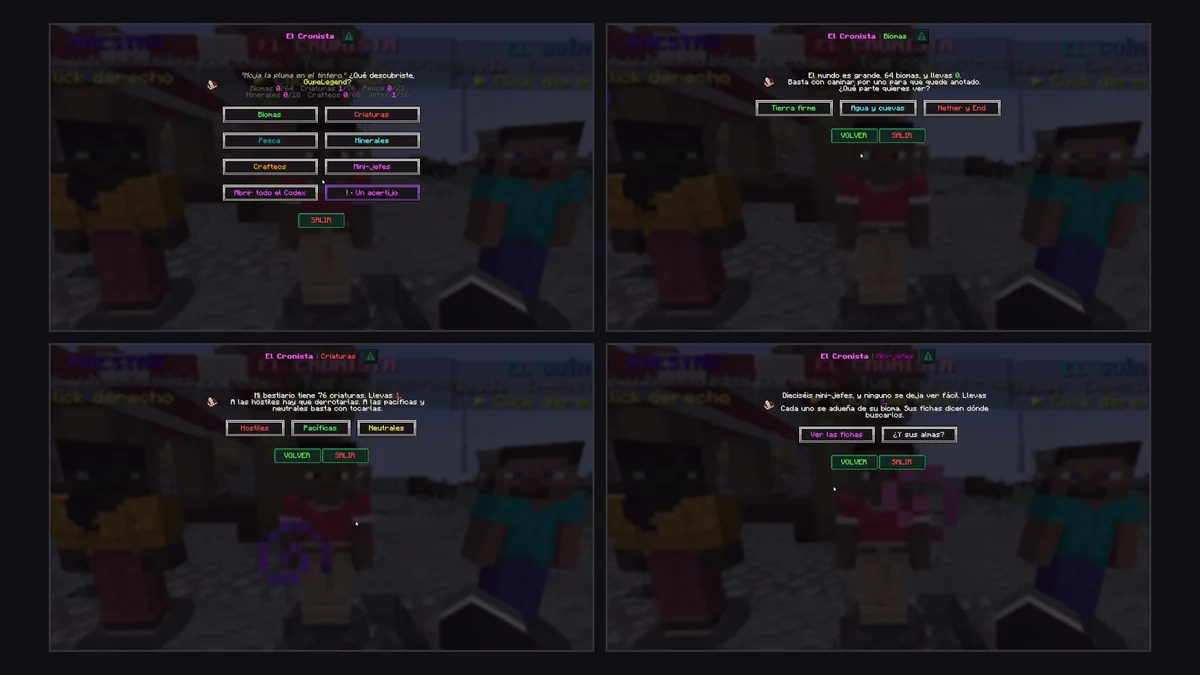
Each category uses its own frame color; "Back" and "Exit" always stay as native buttons at the foot of the screen.
Commands
All admin subcommands require the ultradialogue.admin permission (op by default). Command aliases: /ud, /dialogue, /dialogo. The legacy dialogos.admin permission also grants it.
| Command | Spanish alias | What it does |
|---|---|---|
/ud or /ud editor |
— | opens the button editor (in-game only) |
/ud open <id> [player] [node] |
/ud abrir |
opens a dialogue manually — works from the console and from other plugins |
/ud reload |
/ud recargar |
reloads the config, the language and all dialogues |
/ud list |
/ud lista |
loaded dialogues and their NPCs |
/ud flags <player> [clear [flag]] |
/ud marcas ... [borrar [marca]] |
view or clear a player's flags |
/ud affinity <player> [id] [set\|add\|reset] [n] |
/ud afinidad |
view or change affinity (staff only; add ignores the anti-farming limits) |
/ud icons |
/ud iconos |
every icon with its name, drawn exactly as that player sees it |
Players don't need any permission to talk to the NPCs.
Permissions
| Permission | Default | Grants |
|---|---|---|
ultradialogue.admin |
op |
opening, reloading and managing dialogues, including the button editor |
dialogos.admin |
false (inherits ultradialogue.admin) |
compatibility node for the plugin's former name ("Dialogos") |
Configuration
The full config.yml, with its real default values:
# en | es — language of the plugin's messages
language: en

# dialog = the native dialogue screen (Minecraft 1.21.6+)
# chat   = text with clickable replies in chat
# Clients older than 1.21.6 (coming in through ViaVersion) always get the chat version.
mode: dialog

# legacy = &a &l &#ff8800   |   minimessage = <green> <bold> <#ff8800>
format: legacy

# Console command that runs the "menu: <name>" action. Opens a DeluxeMenus menu by default.
menu-command: 'dm open {menu} {player}'

screen:
  text-width: 260
  button-width: 220
  columns: 1
  close-with-esc: true
  exit-button: false       # adds a "Goodbye" button below each screen's replies
  nav-width: 64             # width of the nav buttons (back, exit, reward...)
  locked-color: '&8'        # color of a "locked" reply while its "if" isn't met
  locked-sound: 'block.note_block.bass 0.6 0.8'
  layout:
    button-format: '&8[ {text}&8 ]'     # "{text}" = the reply's text
    locked-format: '&8[ {text}&8 ]'
    gap: 2                              # spaces between two buttons on the same row
    row-width: full                     # full = every row the same width · fit = each row sized to its text · a number = minimum width in pixels
    buttons: auto                       # auto = panels drawn only for those who loaded the pack · pack = always drawn · text = always "[ text ]"
    look: filled
    style: liso
    border: doble
    force: true              # true = applies this style/border to EVERY dialogue, ignoring their own
    force-colors: true        # true = uses the semantic colors, ignoring each dialogue's own colors
    force-border: false       # true = applies the "border" above to every dialogue, but each one keeps its own background
    border-colors:
      default: '#FFFFFF'      # questions (no icon)
      mision: '#F2B21E'
      principal: '#4CD964'
      secundaria: '#4F8BFF'
      acertijo: '#B36BFF'
      aceptar: '#4CD964'
      premio: '#FFD23F'
      cuento: '#7FD6FF'
      probabilidad: '#FF9F43'
      volver: '#C6E86B'
      salir: '#E04B4B'
      locked: '#5A5A5A'

left-click: false           # only right-click opens a dialogue; true = left-click too
cooldown-ms: 700             # milliseconds between two clicks on the same NPC
max-distance: 8.0            # if the player walks farther than this from the NPC, replies stop working
talk-sound: 'entity.villager.ambient 0.6 1.1'   # sound on each line the NPC says; each dialogue can override it

affinity:
  min: 0
  max: 100
  cooldown-minutes: 30       # a character only GIVES affinity once every so many minutes per player (anti-farming)
  max-per-talk: 3            # the most affinity a single conversation can give

icons:
  mode: auto                 # auto = images for those who loaded the pack, text symbols for everyone else · sprite = always images · text = always symbols

resource-pack:
  enabled: true
  mode: internal              # internal | url
  host: "AUTO"                # AUTO looks up the server's public IP via api.ipify.org
  port: 8083
  url: ""
  force: false
  prompt: ""                  # empty = uses the language file's text
Tip: if another external provider (EcoItems, for example) delivers the merged resource pack, disable UltraDialogue's own delivery and assume the pack already includes the font:
resource-pack:
  enabled: false
screen:
  layout:
    buttons: pack
Merge these keys into your existing config.yml; don't replace the whole file or duplicate the screen: section. buttons: pack assumes the font is already present and can't confirm an external provider's state. For the plugin's mode: url, the external provider must serve exactly the same bytes as the pack bundled in the jar: its hash is computed from the embedded ZIP, not from a pack merged externally.
Placeholders and integrations
PlaceholderAPI
| Placeholder | Value |
|---|---|
%ultradialogue_affinity_<id>% |
the player's affinity with that character |
%ultradialogue_flag_<flag>% |
true / false |
These work as real requirements in BeautyQuests (placeholderRequired), to lock menu items in DeluxeMenus, or in any other plugin that reads placeholders.
FancyNpcs
Link a dialogue to an NPC by listing it in npcs:; clicking opens the conversation instead of the NPC's own actions. npcs.yml is never touched.
DeluxeMenus (or any menu plugin)
The menu: name action runs the menu-command from config.yml (by default, dm open {menu} {player}, for DeluxeMenus). Changing that line makes it work with any other menu plugin that accepts opening a menu via a console command.
ViaVersion
Clients on a version older than 1.21.6 get the same conversation as text in chat, with clickable replies, with no extra work needed from the server operator.
BeautyQuests 2.1
Quest conditions (quest:) and actions (quest:), and its own ULTRADIALOGUE stage type — see Deliveries: items, shop and rewards.
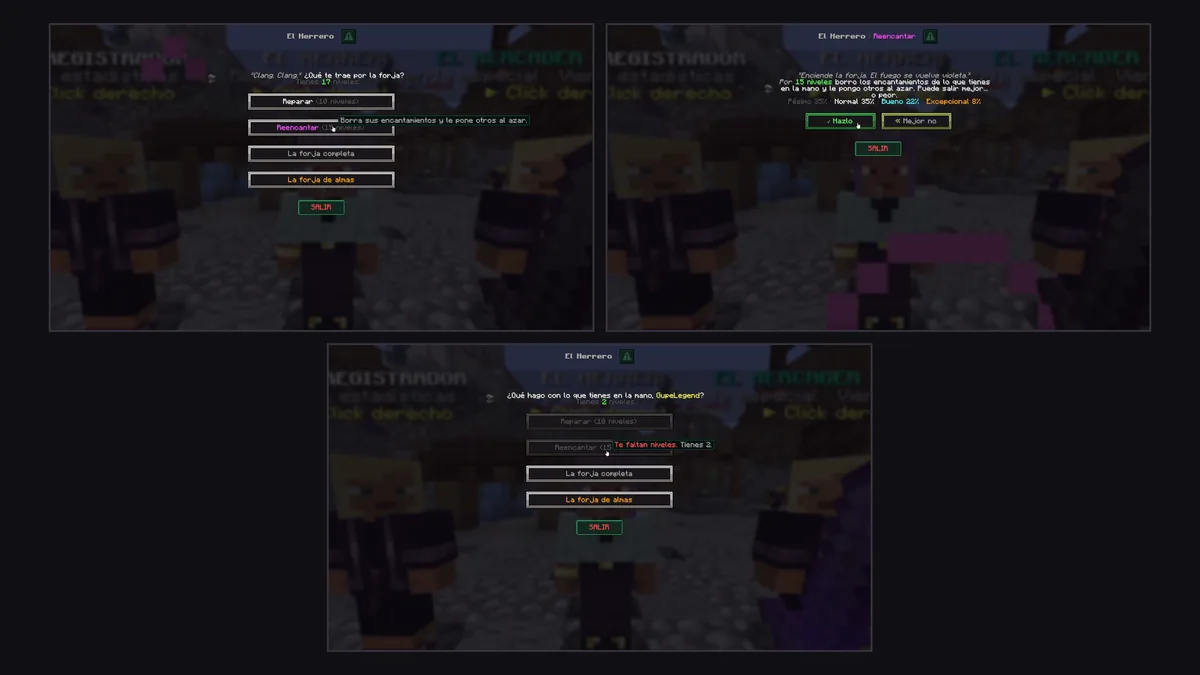
Before accepting a job, the player sees what it's about, who's asking, the steps, and the reward — all built with layout: and inventory conditions.
Bedrock players
Behavior on Bedrock/Geyser is not verified. The only confirmed and documented fallback is for Java clients older than 1.21.6 via ViaVersion, which get the conversation in chat instead of the native screen. If you run a cross-play server, test the behavior in your own setup before assuming anything, and consider forcing mode: chat if you need a uniform presentation for every player.
Full examples
A wandering merchant
Based on dialogues/merchant.yml, bundled with the plugin: greets you differently the first time and opens a DeluxeMenus menu.
name: '&2&lThe Wandering Merchant'
npcs: [mercader]
portrait: 'npc | item:EMERALD'
sound: 'entity.wandering_trader.ambient 0.7 1'
start:
  - if: '!flag:conocio_mercader'
    node: intro
  - node: hola
nodes:
  intro:
    on-show: ['flag: conocio_mercader']
    text:
      - 'Psst! You, with the empty pockets. Come closer.'
      - 'I have things you will not find anywhere else. But I never stay long...'
    next: hola
  hola:
    text: 'My wares change every &fMonday&f. What you see today might not be here tomorrow.'
    answers:
      - text: '&2Show me your goods'
        tooltip: '&7Opens the "shop" menu (DeluxeMenus).'
        actions: ['menu: shop']
      - text: '&7Where do you get all this?'
        goto: secreto
      - text: '&8Not interested'
        goto: end
  secreto:
    text: 'A good merchant never reveals his suppliers. &7&o*smiles*'
    answers:
      - text: '&2Show me your goods'
        actions: ['menu: shop']
      - text: '&8Goodbye'
        goto: end
A delivery job with a quest
A blacksmith who asks for materials, conditioned on an active BeautyQuests stage, and who pays with affinity and a reward.
name: '&6&lBrann the Blacksmith'
npcs: [brann]
portrait: 'npc | item:ANVIL'
start:
  - node: taller
nodes:
  taller:
    text: 'The forge has been cold for three days. I am short on iron.'
    layout: [1, 1]
    answers:
      - text: '&aDeliver 16 iron ingots'
        icon: accept
        if: ['quest: active brann_hierro', 'has: IRON_INGOT 16']
        locked: '&7I do not have enough iron, or I do not need it anymore.'
        actions:
          - 'take: IRON_INGOT 16'
          - 'give: EMERALD 4'
          - 'affinity: +3'
          - 'quest: complete brann_hierro'
        goto: gracias
      - text: '&7What exactly do you need?'
        icon: story
        goto: detalles
    nav:
      - back
      - exit
  detalles:
    text: 'Sixteen iron ingots. No more, no less.'
    answers:
      - text: '&7« Back'
        goto: taller
  gracias:
    text: 'Finally! With this the forge is running again. Thank you, truly.'
# in the corresponding BeautyQuests quest
'1':
  stageType: ULTRADIALOGUE
  key: brann_hierro
  npc: brann
  customText: '§7Bring §f16 iron ingots §7to §fBrann'
A guide with growing affinity
Based on dialogues/kadir.yml, bundled with the plugin: a traveler who opens up based on how much you've talked to him, with rotating questions and a one-time gift.
name: '&6&lKadir'
npcs: [kadir]
portrait: 'npc | item:COMPASS'
affinity:
  min: 0
  max: 100
  cooldown-minutes: 30
  max-per-talk: 3
start:
  - if: 'affinity >= 50'
    node: amigo_cercano
  - if: 'affinity >= 25'
    node: amigo
  - if: 'affinity >= 10'
    node: conocido
  - node: desconocido
nodes:
  desconocido:
    variants:
      - '&7&o*looks at you* &fYes? What do you want?'
      - 'I do not usually talk to strangers. Make it quick.'
    show: 2
    answers:
      - text: '&7Hello. Who are you?'
        actions: ['affinity: +2']
        goto: quien
      - text: '&7Nice compass.'
        actions: ['affinity: +1']
        goto: compas
      - text: '&8Get out of my way, old man.'
        actions: ['affinity: -3']
        goto: ofendido
      - text: '&8Goodbye.'
        always: true
        goto: end
  quien:
    text: 'Kadir. Cartographer, traveler... whatever it takes to keep walking.'
    answers:
      - text: '&7« Keep talking'
        actions: ['dialogue: kadir']
  compas:
    text: '&7&o*puts it away* &fIt does not point north. It points to what I am looking for. None of your business.'
    answers:
      - text: '&7« Keep talking'
        actions: ['dialogue: kadir']
  ofendido:
    text: '&7&o*frowns* &fManners cost nothing, you know?'
  amigo_cercano:
    answers:
      - text: '&dKadir, got something for me?'
        if: '!flag:regalo_kadir'
        goto: regalo
      - text: '&8See you around, friend.'
        always: true
        goto: end
  regalo:
    text: 'Here. It has been with me on every trip. Now it is your turn to look after it.'
    on-show:
      - 'flag: regalo_kadir'
      - 'console: give %player% minecraft:recovery_compass 1'
      - 'sound: entity.player.levelup 0.8 1.2'
    answers:
      - text: '&7Thank you, Kadir. I will take care of it.'
        goto: end
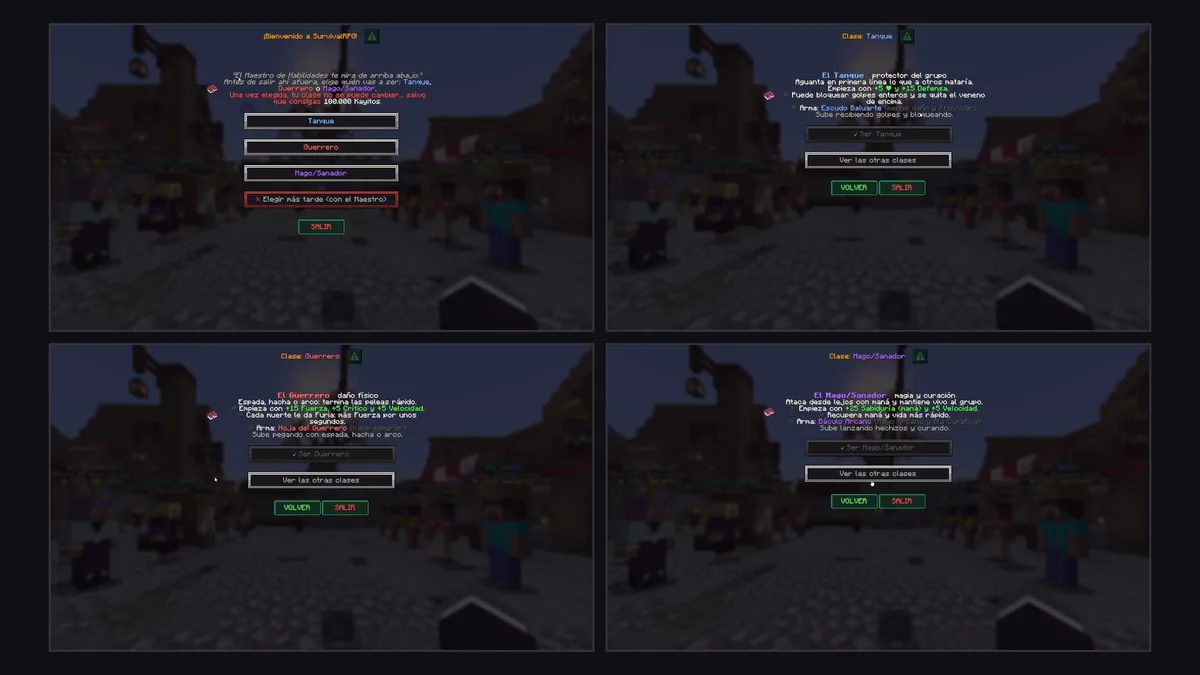
Back remembers the path taken within the same conversation, even if it crossed from one dialogue into another.
FAQ
Do I need a resource pack to use UltraDialogue?
No, not for the basic presentation. Buttons and icons are plain text by default. The resource pack is only needed if you want the RPG panels with a background and frame from layout:; without it, those same buttons look like [ text ].
Does it work without FancyNpcs?
Yes. You can open a dialogue with /ud open, from another plugin, or by tagging any entity with dialogue:<id>. FancyNpcs just adds the convenience of linking it by click.
What happens if I don't have BeautyQuests installed?
The plugin still loads. Quest conditions (quest:) are always false, the quest: start/force actions do nothing, and the console warns about it once per dialogue. quest: complete still fires the DialogueSignalEvent event even if BeautyQuests isn't there.
How do I stop an NPC from always repeating the same greeting?
With a flag (flag:) set in on-show the first time, and a start rule that checks it; or with variants:, which picks a different line each time.
Can I have different dialogue depending on how well I get along with the character?
Yes, that's exactly what affinity is for: start rules with if: 'affinity >= N', and replies visible only from a certain level up.
If I edit a dialogue while players are talking to that NPC, does anything break?
Nothing breaks, but it doesn't hot-update either: /ud reload doesn't close conversations already open. Ask those players to close and reopen the chat after reloading.
Does it support Folia?
No. plugin.yml declares it explicitly (folia-supported: false).
And Bedrock/Geyser? Not verified. The only tested fallback is for old Java clients via ViaVersion.
Can I use another menu plugin instead of DeluxeMenus?
Yes, any plugin that supports opening a menu via a console command: just change menu-command in config.yml.
Where are flags and affinity stored? On the player itself (PersistentDataContainer), not in a separate database. There's no file to back up or sync between servers, unless you use something like a shared-profiles network plugin.
What happens if give: can't build the item I'm asking for?
It logs a warning in the console (Cannot give '...') and gives nothing; check that the format is a valid material, ultraboss:<id> or ultrarevive:<id> — the pdc:, item_model: and name: formats are good for identifying an existing item, but not for creating one from scratch.
Version history
1.1.3 — 2026-10-15
A button editor in /ud, a much smaller resource pack, and reorganized code. It doesn't change how dialogue files are written or how conversations play out.
- In-game button editor:
/ud(or/ud editor) opens a menu to pick a dialogue, a node, and edit each button — text, icon, size and position — without touching a text editor. It only touches buttons; the rest of the node is edited in the file. - Much smaller resource pack: only includes the
flatbackground and thedoubleborder; the jar went from ~570 KB down to ~200 KB. Older style or border names still load without error, with a one-time console warning. - Its own data folder:
plugins/UltraDialogue/instead of the sharedplugins/UltraView/UltraDialogue/. Migration is automatic and announced once. - Reorganized code into packages (
command,config,migration,model,registry,gui,listener,pack,hook,util) and fully translated into English (dialogue files still accept Spanish keys, as always). Built with Gradle (Kotlin DSL) in addition tocompilar.sh.
1.1.2
Free rows, a clean double-frame theme, quest symbols, and better navigation. Server target: Paper 26.1.2 with Java 25.
layout:/filas:per node, for layouts like[1, 2, 2, 1]or[3, 1]; rows of 1 to 6 buttons, drawn as clickable text in the dialogue's body.nav:becomes a row of real buttons.- Simple RPG panels: flat dark background and double frame by default (
style: liso,border: doble,look: filled); the frame color follows each button's icon.border-colorslets you customize the palette. - Ten text icon presets replace the 20 pixel-art sprites from 1.1.1 (
heart,gem,gift,star,shop...), which no longer have any effect. locked:, Back with history across dialogues, a fixed Exit at the bottom, and per-nodetitle:.
1.1.1 — 2026-09-26
- Button sizes
size: 1to4(20/98/150/204 px) or an exactwidth: N;columns:per node; a reply can be icon-only, with no text. - 20 pixel-art icons (replaced in 1.1.2), served by the plugin on port 8083, with a text fallback for anyone who didn't load the pack.
- 2D NPC face next to its name, instead of the dark-silhouette 3D head from before.
- Deliveries:
has:/hand:conditions andtake:/give:actions;take:is all-or-nothing, re-checked on click. - Quests and story gating:
quest: completed/started/activeconditions,quest: complete/start/forceactions, BeautyQuests'ULTRADIALOGUEstage type (optional), and theDialogueSignalEventevent. - Placeholders
%ultradialogue_affinity_<id>%and%ultradialogue_flag_<flag>%. - Spanish keys:
icono,tamaño/tamano,ancho,columnas,tiene,mano,quitar,dar,mision(completada,en-curso,activa,completar,empezar,forzar).
1.1 — 2026-09-26
- Affinity: a hidden friendship level per player and per character, with anti-farming (a 30-minute cooldown and a maximum of 3 points per chat, both configurable), manageable with
/ud affinity. variants:andshow: Nfor conversations that don't always repeat the same way;always: trueto take a reply out of that rotation.- New example
kadir.yml. Spanish keys:afinidad,variantes,mostrar,siempre,cooldown-minutos,max-por-charla.
1.0 — 2026-09-25
First public release, for Minecraft 26.1.2. Started out as a private plugin called "Dialogos", built for a single server.
- Native dialogue screens (1.21.6+): portrait, text, and replies as buttons. No resource pack, no client mod.
- Branching conversations in YAML: nodes, replies,
next,startrules. - 13 actions:
goto,dialogue,menu,command,console,message,broadcast,actionbar,title,sound,flag,unflag,close. - Permission, flag and PlaceholderAPI-comparison conditions.
- Per-player flags (PersistentDataContainer), portraits with alternatives, FancyNpcs support, entity tags, chat fallback for older clients (ViaVersion), English and Spanish.
- Changes from the private plugin: renamed from "Dialogos" to UltraDialogue (
/udcommand,ultradialogue.adminpermission,mc.gupe.ultradialoguepackage); automatic migration fromplugins/Dialogos/dialogos/the first time it starts.
Links
- Modrinth: modrinth.com/plugin/ultra-dialogue
- Source code (GitHub): github.com/GupeLegend/UltraDialogue
- License: MIT © 2026 Social Studio